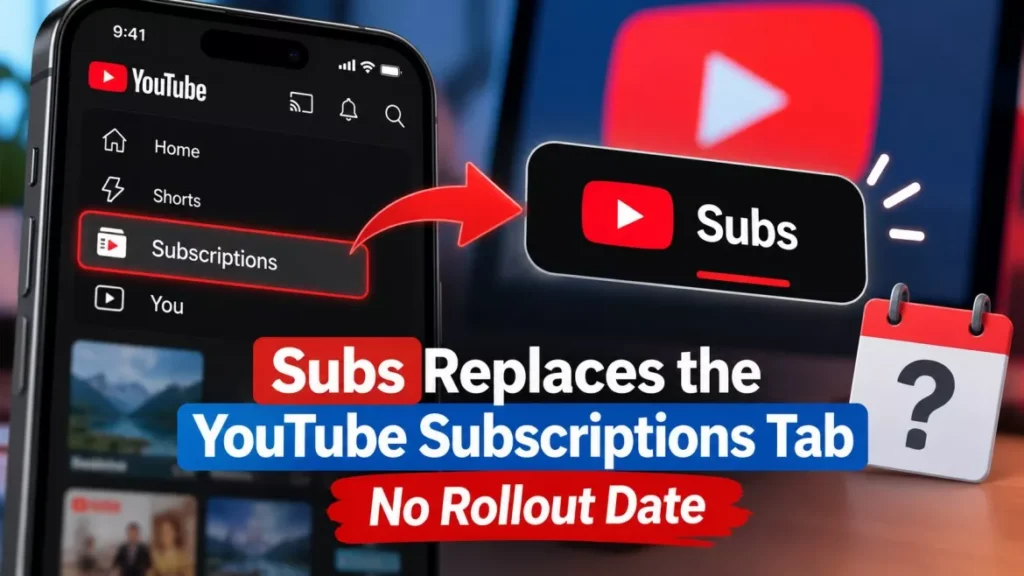

The YouTube Subscriptions tab has left the mobile bottom bar and now sits inside the Home screen, renamed Subs. The change began rolling out on 22 October 2026 on Android and iOS, alongside new Live, Music and Movies & TV feeds. YouTube has not said when it reaches every account.
How to Open the Subs Feed on Android and iOS
The feed has not been deleted; it sits one level deeper, at the top of the Home tab. Three taps get you there:
- Open the YouTube app: Use the Android or iOS app, signed in to the account whose subscriptions you want.
- Tap Home: This is the first icon in the bottom bar, which now holds four items instead of five.
- Tap Subs: It is the second entry in the row of feeds across the top of Home, directly after Home itself, and it carries a red underline when selected.
Subscriptions had occupied the fourth slot in the bottom bar since 2017, according to 9to5Google, which first reported the removal on 22 October 2026. Reaching the feed now takes an extra tap and a reach to the top of the screen.
What Else Changed in the Home Top Bar
The row that now holds Subs also carries three other destinations that were previously buried in menus.
- Live: A dedicated feed of live streams.
- Music: A dedicated music feed.
- Movies & TV: Shown in the top bar only for viewers with an active paid subscription such as a Primetime Channel or a YouTube TV add-on. Everyone else finds it under More.
- More: A catch-all entry for the destinations that do not fit the row.
Two older navigation elements disappear in the process. 9to5Google reports that the redesign removes YouTube’s navigation drawer, the slide-out menu on the left. Android Authority reports that the predefined topic chips that used to sit above the mobile Home feed are replaced by custom feeds. Neither change has been described in a public post by YouTube itself.
Who Sees the New Layout, and Who Does Not
Two separate changes shipped on the same day with different eligibility rules, which is the main source of confusion about this update. The top-bar redesign and custom feeds are not gated the same way.
| Condition | Home top bar and Subs | Custom feeds |
|---|---|---|
| Countries | No limit stated by YouTube | United States only |
| Language | No limit stated by YouTube | English device language |
| Sign-in | Not specified | Required |
| Watch and search history | Not specified by YouTube | Must be turned on |
| Phones | Android and iOS | Android and iOS |
| Tablets | Not specified | Not available |
| Computers | Not part of the announcement | Available |
The restrictions in the custom feeds column come from YouTube’s own Help page, which states that “this feature is currently available in English in the United States” and that custom feeds are not available on tablets. The top-bar redesign carries no such published geography, and PPC Land reported on 23 October 2026 that some viewers outside the United States were already seeing it.
One practical consequence is worth knowing before you start hunting for a missing feed. PPC Land, reading YouTube’s Help pages, reports that the new feeds and the top bar are hidden altogether when watch history is paused or switched off. YouTube has not confirmed that in a public statement, so treat it as a single-outlet finding rather than settled fact.
Custom Feeds Are Capped at Three, or Eight With Premium
Custom feeds let you describe the videos you want in your own words and keep the result as a tab on Home. The caps are now published, having previously been one feed per account during a May 2026 test, as PPC Land reported.
- Without YouTube Premium: Up to three active custom feeds at a time.
- With YouTube Premium: Up to eight active custom feeds at a time.
- Expiry: A feed’s prompt expires after 30 days of inactivity, after which you create a new one. YouTube’s Help page does not define what counts as activity.
To create one, open Home, choose Custom Feed in the upper-left corner and type a prompt or pick a suggested one. You can rewrite a feed’s prompt at any time by selecting the feed and tapping its text box. Feeds built on a phone appear on a computer when you are signed in to the same account. This site covered the feature when custom feeds first gained Home tabs with a one-feed limit in September 2026.
Rollout Status as of 25 October 2026
The redesign is partially deployed and no completion date exists. As of 25 October 2026, the Subs move and the new top bar are rolling out on Android and iOS, and custom feeds are live for signed-in viewers in the United States using English on phones and computers. Many accounts still show the old five-item bottom bar, and YouTube has given no date for when the layout reaches everyone or when custom feeds reach other countries.
At its Made on YouTube event on 23 September 2026, the company said only that “custom feeds will be available for users in the U.S. on web, mobile, and TVs soon”. The October rollout delivered web and mobile; televisions are still outstanding.
What YouTube Has Not Said
Several questions readers are asking have no answer from the company yet.
- Reversibility: No setting to return Subscriptions to the bottom bar has been announced, and no outlet has found one.
- Full rollout date: None published for the top bar or for countries beyond the United States.
- Desktop layout: The announcement described the mobile apps; it did not state any change to the website’s navigation.
- Tablet apps: YouTube says custom feeds are unavailable on tablets but has not said whether the top-bar redesign reaches them.
YouTube framed the work as the start of a longer project, saying it is “kicking off a series of updates to shape a more seamless Home experience”, in wording quoted by 9to5Google. The company has not published a roadmap for the rest of it. An earlier change to how the platform ranks short videos, covered here as the Shorts algorithm update that cut reach for reposted clips, was announced the same way, through a creator post rather than a formal release note.
Frequently Asked Questions
Where Is the YouTube Subscriptions Tab Now?
It is inside the Home tab, renamed Subs, as the second item in the row of feeds across the top of the screen. Open the app, tap Home, then tap Subs.
Why Did YouTube Move It?
YouTube described the redesign as the beginning of a series of updates aimed at a more seamless Home experience, and used the freed space for Live, Music and Movies & TV feeds. It has not given a more detailed reason.
Can I Move Subscriptions Back to the Bottom Bar?
No option to do that has been announced. If your app still shows the old bottom bar, the redesign has simply not reached your account yet.
Does the Change Affect YouTube on a Computer?
The announced change covers the Android and iOS apps. YouTube did not describe any change to the desktop website’s navigation.
How Many Custom Feeds Can I Keep?
Three at a time without YouTube Premium and eight with it. Each feed’s prompt expires after 30 days of inactivity.